Showing posts with label mac. Show all posts

Wednesday, April 1, 2015

AutoCAD/LT for MAC: FAQ

Are you curious about the MAC version of AutoCAD/LT? Or a current user looking for basic answers? This blog post will attempt to answer the most common questions you might have about this Apple OS based software (This is not an April Fools post).
  • Where is the Ribbon?
    The MAC version of AutoCAD/LT has an Apple-base user interface that reflects Autodesk's complete rewrite of the program from the ground up. They chose not to implement a Microsoft Windows interface for this new variant: they probably still remember the backlash when, back in the day, AutoCAD for DOS' interface was used on Mac, Unix and Sun workstations much to the dismay of core users of those systems. Other visual differences:
    - All toolbars are accumulated in Tool Sets palette with the ability to switch between tabs with sets of icons.
    - All UI elements could be either floating or docked to the sides of the screen (Tool Sets to the left or to the right: Layers, Properties, Content, References, Projects, Materials palettes to the left or to the right side; Command window and Status Bar to the bottom side).

  • Will I be able to share DWG and DXF files between the Windows and Mac versions of AutoCAD?
    Yes. And it requires no special effort or any change. Just send and receive your files freely.


  • I want to import my custom CUIx file from AutoCAD for Windows to the MAC version, how do I do that?
    Unfortunately there is no such feature in AutoCAD for Mac. You cannot import personal CUI file from PC to Mac.
    If you want to transfer your custom commands or macros from PC to Mac, you need to do this manually with the CUI editor. Note: not all functions are available in the Mac versions and some custom commands (macros) may not work in AutoCAD/LT for Mac.

  • Can I import and use plot style tables (STB or CTB) from AutoCAD in Windows?
    Yes you can: place your plot style table file in the "~/Library/Application Support/Autodesk/roaming/AutoCADversion/Rxx.x/enu/Plotters/Plot Styles" (Library folder in your Home folder); after that it should appear in "Advanced" dialog box of "Page Setup" dialog (or "Print" dialog). You can also try this method HERE.


  • How do I create a new plot style table file in the MAC versions of AutoCAD/LT?Not an option yet: AutoCAD/LT for Mac has no plot style creator/editor available.
    Either ask a Windows version user to create/edit one for you, or use THIS free cad software for mac that allows you to edit CTB and STB.

  • How do I change my DWG file from using STB to using CTB (or vice versa) plot style tables?
    Unlike AutoCAD/LT in Windows, AutoCAD/LT for MAC have no CONVERTPSTYLES or  CONVERTCTB commands to convert named plot styles to color plot styles (or vice versa) "on the fly".
    But there is workaround - if you want to convert STB-based DWG to CTB-based:
    1. Create new drawing using CTB-based template
    2. Copy all objects from your STB-based file and paste it into this new file.
    3. Reverse the process for moving from CTB to STB.

  • How do I add custom or extra fonts to AutoCAD/LT for MAC?
    If these are AutoCAD SHX fonts, than you need to place them inside AutoCAD application folder: find the AutoCAD/LT application in Applications folder on your Mac, right-click on it, select "Show package contents" from context menu. Now type SHX in the Spotlight search field of the current Finder window, then look for the SHX folder in search results, double click to open it. Here you can copy your font files. Restart AutoCAD and now you can use fonts.
    If your fonts are TTF, than you need to place them to the ~/Library/Fonts folder, and don't forget to restart AutoCAD/LT.

  • Can I create PDF files in AutoCAD/LT for MAC? There is no AutoCAD driver installed.
    Yes, you can save (plot) or export to PDF without adding any drivers: the MAC OS is equipped with it by default and is available to all MAC OS programs, explore HERE. Note that there are currently no options to include Layer lists into the PDF.

  • Where are the Express Tools in AutoCAD for MAC?
    There are no Express Tools in AutoCAD for MAC, nor in LT for MAC.

  • How do I change command shortcuts in the MAC version? Is there a PGP file to edit?
    Click the Tools menu > Customize > Edit Command Aliases (PGP). Note: The default PGP file can also be opened by launching Finder, pressing and holding Option, and clicking Go  Library. In the Finder window, navigate to Application Support/Autodesk/Roaming////Support and double-click acad.pgp (or acadlt.pgp for AutoCAD LT) to edit the file. If prompted for an application to use, select TextEdit.
    In the text editor, add your new command aliases to the bottom of the file. Save the PGP file after you make the desired edits.
    In AutoCAD or the AutoCAD LT, click Tools menu  Customize  Reload Command Aliases (PGP).
    Alternate Method: Find the acadlt.pgp file on your Mac: it is in ~/Library/Application Support/Autodesk/roaming/AutoCAD LT Standdalone/Rxx.0/enu/Support folder, then edit it in Textedit.app as described in Help documentation (Help->Customization Guide->Basic Customization->Create Command Aliases.

  • Pressing the F-Keys like F3 and F8 don't work? Delete key doesn't work?
    On a MAC you have to press and hold the fn key first to activate those keys: fn+F3, fn+F8, fn+DELETE activate these keyboard keys while in AutoCAD/LT for MAC.
    For a permanent fix, go to the MAC OS System Preferences > Keyboard >Keyboard and check "Use all F1, F2, etc keys as standard . . . ". You can check the other box for "Show Keyboard & Character Viewers in Menu Bar" so you can jump right to this preferences pane from the Menu bar and change it. While Standard F1 keys is checked, you can hold fn to go back to the special functions (volume control, brightness, etc).

  • I can't find any option for Layer States in my AutoCAD/LT for MAC, why?
    You need to upgrade to AutoCAD/LT2015 for MAC for that ability: older versions offer an older subset using -LAYER command (there is a dash in the name) that is not quite as advanced.

  • Can I create and use Dynamic Blocks in AutoCAD/LT for MAC?
    Yes, starting with the 2015 versions you can create and edit Dynamic Blocks. In earlier versions, creating them was not an option.

  • Does AutoCAD/LT for MAC support Retina Displays?
    According to Autodesk, Retina support works as designed only if you set resolution in Mac OS System preferences to "Best for display", which means effective desktop resolution of the standard 15-inch MacBook Pro's 1440 x 900 panel, but with four physical pixels driving every single pixel represented on the screen.

  • There is no eTransmit command: how do I send drawing files to others from the MAC version?
    While that is true for older MAC versions of AutoCAD/LT, you can set up a free AutoCAD360 web account and ships it like THIS to solve it. eTransmit is available in current versions.

  • Where can I download language packs for AutoCAD/LT for MAC?
    To date there are no language packs for any version of AutoCAD/LT for MAC 2015 and lower versions. MAC versions of AutoCAD/LT are only available in English and French.

  • Can I set the mouse middle button in the MAC versions to behave like the Windows version?
    Yes you can, read this AutoCAD Forum thread on the topic HERE.

  • What other commands are missing from AutoCAD/LT for MAC that are found in the Windows versions?
    The following core commands do not exist on the MAC versions as of this blog date: CHSPACE, Geolocation and ADCENTER (Content Palette has some similar, but not all, abilities) are a few of the differences, for more details explore these links for AUTOCAD and LT.

  • Ready to get started? Still not sure?
    Visit this Lynda.com webpage for quick short tutorials to help your Migration From Windows To MAC with AutoCAD/LT. You can also review the AutoCAD/LT Shortcuts Guide ONLINE or as a downloadable PDF.
I would like to thank my fellow Autodesk Expert Elite Maxim Kanaev for his many posts at the Autodesk Forums that made this blog post possible. ◦
Share/Bookmark

Wednesday, February 11, 2015

4K and Touch Screens: is AutoCAD/LT ready for both?

Three years ago I wrote about my experience with AutoCAD/LT with my first ever full Windows Tablet HERE. How have things changed with Windows 8.1, new touchscreens, high-res monitors and more?

4K displays

The allure of these, especially for CAD users, is strong: more pixels, content designed for 4K look almost impossibly crisp; games and CAD programs hardly need anti-aliasing because the “jaggies” between pixels become almost unnoticeable; and fonts are rendered as if they were printed on paper and then stuck behind the screen. A better experience overall, right?

The Challenge for computer monitors: when a 4K television is sent a source with a resolution below its native resolution, it will use a scaling algorithm to compensate for the difference. HDTV makers have spent a lot of time researching the best way to accomplish this, and televisions ship with respectably quick processors (usually based on ARM architecture) to deliver fast, high-quality scaling.
Computer monitors have no such hardware, and just do what they’re told by the video card and the operating system. If a program says its main menu should be 500 pixels tall, you’re getting a menu that’s 500 pixels tall. So, as pixel count increases, that menu becomes smaller, and smaller, and smaller, until it’s so small it can hardly be used.

Microsoft has responded to this issue with a variety of features, including built-in scaling and font calibration, but the pace of the company’s response has fallen behind the advance of technology. How?

PC Gamer offered the best explanation HERE.
Jamie and Adam went a little further at CES and posted this more detailed review HERE.

Think you are immune using an Apple MAC? Read THIS for an honest review.

What does this mean for AutoCAD/LT2015 users: tiny icons, oddly displayed text sizes at the commandline, and more. Click on this screenshot to see the problems in more detail.

While the real fix needs to come from Microsoft and Autodesk (and almost every other software manufacturer who's software you use), the tip HERE seems to work well for me for many software (including AutoCAD) on my 4K monitor.

4K isn’t even the latest new thing anymore. Some manufacturers are now pushing “5K” monitors with an even higher resolution: Apple sells an iMac with a 5K display designed to be a 4K monitor with screen space allocated for application toolbars and tools.

Touch Screens

With the market full of interesting full Windows OS capable and seriously portable devices such as Microsoft's Surface Pro Tablet, along with offering HP, Dell and Lenovo to name a few, the attraction to be fully mobile with AutoCAD is hard to resist.

Follow us in our next post as we review if AutoCAD/LT can be useful on these devices. ◦
Share/Bookmark

Tuesday, October 22, 2013

AutoCAD/LT for MAC 2014: It's here!

Revised Welcome Screen

The long anticipated 2014 release of AutoCAD for MAC was announced to all users on Subscription October 18, 2023. But no one could find it to download it (see HERE): but if you are on Subscription you can get it now, today, October 22, 2013.

So, what is new in AutoCAD for MAC 2014 edition? Let's first examine what end users are wishing for, a question we posed at the Autodesk Discussion Forums:
  • Would like to see camera / animation features.  Material import ability.
  • Usability in 3d, fix the bugs, bring it on par with Windows.
  • Start releasing the verticals.
  • Export layouts in pdf format. On windows platform the function seems pretty easy: different sizes sheets exporting in one pdf file. On mac all sheets can be combined in one pdf file but with the only one sheet size (A4, for example).
  • It could be great to see selection filters, multiline styles and ole objects.
  • IGES import.
  • DGN import
  • Express Tools
  • Smaller PDF output**
  • Retain window/palette positions after closing
  • Content Explorer.
  • Be able to Scale materials from the Material Browser for rendering, just as the Windows AutoCAD.
  • All windows version functions with mac interface.

Here is what Autodesk delivered with AutoCAD for Mac 2014:
  • Drawing Sync allows you to directly access your files from Autodesk 360 and synchronize them between your computer and the cloud (you will need to be signed in to Autodesk 360 first).
  • Package Drawing (Similar to eTransmit command in AutoCAD for Windows) allows you to quickly collect related files into a compressed folder for easy distribution or storage.
  • Retina Display Support.
  • Autodesk has revamped the Welcome Screen to create a more-functional experience.
    Now it’s easier to work with files when creating a new drawing or working on an existing one.
    It also gives the user quick access to learning materials, cloud storage, and helps connect with other AutoCAD for Mac users so you collaborate, share information, and solve problems.
  • Online Help: less cluttered and with focused search-based access to the information you need, mark pages for future reference and refine your search results by choosing the following topic types: Documentation, Installation & Deployment and Developer’s documentation.
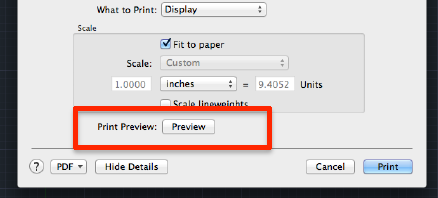
  • Print Preview is now added to the Print Dialog/pop-up.
  • Smaller PDF output**.
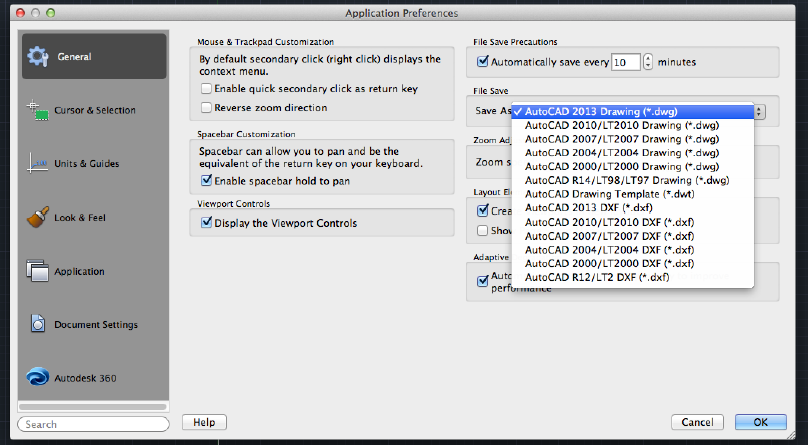
  • Default SaveAs format: it's now possible to set a default save-as version for your drawing. To set your save-as version, visit the Preferences dialog found in the AutoCAD menu.
  • Software Security Enhancements: For non-LT users, it helps prevent loading and running of unauthorized or malicious AutoLISP applications.
  • FIND command fixes: when searching a text in a drawing, the view will not switch back and will remain after the text found and located. It is more convenient to search a text in a big drawing.
  • Hardware requirements have not changed much, most users will assume the low specs are acceptable until they use the software fully in production.
Another year, another version: end-user wish lists still rank AutoCAD for Windows features as the most favored items to be added but many have yet to make the transition over to the Apple format.
Share/Bookmark

Sunday, November 18, 2012

Random Links of Interest: light reading

Catch a listing of all our twitter postings HERE http://twitter.com/#!/LTisACAD.
Do you use @pinterest? We pin our favorite AutoCAD/LT news/tips/reviews/Op-Ed webpages to share with all of you at http://pinterest.com/pendeaninc/pins/
 

Share/Bookmark

Wednesday, August 8, 2012

AutoCAD LT for Mac: Tips

Whether you use LT on an Apple or MS Windows PC, finding fellow users and sharing tips with them s a goal many of us have in common.

Share/Bookmark

Sunday, July 8, 2012

Random Links of interest: got time?


Share/Bookmark

Wednesday, August 24, 2011

AutoCAD LT for MAC: is it enough?


This is AutoCAD LT running in Apple's Desktop/Laptop Operating System, and you can purchase it right now from the Apple Apps Store (North America only for now): that's the power LT has at Autodesk, their best selling Windows application, is now readily available to all Mac users.
AutoCAD LT for Mac is, much like its Windows sibling, AutoCAD with no support for LISP or 3D modelling or rendering, and no Network Licensing. It concentrates on the 2D functionality required for drafting and documentation.
AutoCAD LT for Mac follows common native Mac application user interface guidelines (read: No Ribbon), with a familiar Apple menu bar together with a number of workflow-based palettes. It also supports native Mac OS X Lion behavior, including Cover Flow navigation and Multi-Touch gestures, Visual Quickview, Layout Visor, and Cocoa-centric collapsible and dockable Palette System.

So what else is new? This is LT2012 for Mac, and except for the interface, it should be an identical experience, with almost identical commands and features. Work faster with the 2012 productivity tools and enhancements such as multi-functional grips, command line autocomplete, Associative Array, Multi-Function Grips (for more entities), Nudge objects with ctrl+ Arrow keys , Group Enhancements, and Hatch and Mleader enhancement. and more. Watch this VIDEO demonstration.

But, and these are important to many serious drafters, there are some missing LT2012 features compared to the Windows version:
  • Sheet Set Manager (a Batch Publish command is available as a substitute).
  • Migration tools (it is Version 1 for Mac, and you cannot migrate any LT for Windows content).
  • eTransmit Command (you have to share files old-school style, by hunting and searching).
  • CUI Import and Export (you got a great menu but you can't share parts of it with your colleagues).
  • CUI Workspaces (true drafters get this one).
  • Table style editing (Hope your LT for Windows buddy is generous with their time).
  • Dynamic Block authoring (who needs the greatest enhancements to the old blocks anyway).
  • PDF and DWF Underlays (hope your partners are good at sharing DWG files).
  • Filter and Quick Select commands (you cannot custom sort or select objects easily).
  • Hyperlinks.
  • New layer notification.
  • Layer State Manager (Fundamental layer state operations can still be performed using the stAte option in the -LAYER command)
  • Layer Filters (a great tool for those that use Xrefs or have many layers, but not here)
  • Most of the Layer Tools (LAYCUR, LAYDEL, LAYON, LAYTHW, LAYMCH, LAYMRG, LAYWALK, LAYVPI commands are not available: think LT2006)
  • Creating or opening password-protected drawings from AutoCAD for Windows.
  • DGN underlay (limits collaboration).
  • WMF import/export
  • DesignCenter (the equivalent in AutoCAD for Mac is the Content Palette)
  • Tool palettes (the equivalent in AutoCAD for Mac is the Content Palette)
  • Quick Properties palette (the AutoCAD for Mac property palette has “Essential” and “All” views). And if you are hoping to reuse that Digitizer tablet, Digitizer integration has been dropped.
There is also an inexplicable flaw: Command auto-completion may offer commands that are not currently defined or available in LT for Mac 2012.

There are no issues with DWG format: you can share your files with anyone in Windows, and they can share their files with you. 100% compatible, and they mean it.

Command keyboard shortcuts are a little different thatn Windows: see this LINK for details. Yu can define your own with the following PROCEDURE.

Due to the restrictions of the App Store, there is no trial version of AutoCAD LT 2012 for Mac. If you want to try before you buy, your current only choice is get the 30-day free version of AutoCAD for Mac, then make sure you fully read the comparison matrix before you go get AutoCAD LT.

Check out ths FAQ file for bare-minimum system requirements (that's code for it-will-run but you may hate it). FOr the most part, ensure your Apple/MAC is no more than two years old and not the "value" line that is as hobbled as low end Windows PCs from storefront stores.

Explore this new LT variant at the Autodesk WIKIHELP website and soon on YOUTUBE (if you are not on an Apple/Mac of course). Like the full version of AutoCAD for MAC 2012, the missing commands and features combined with the full price/cost of each makes this version a challenge to enthusiastically recommend to professional drafters familiar with AutoCAD/LT. If you are an Apple/MAC devotee, and a true drafting/designing CAD user, I suggest you do not ignore purchasing LT for Windows and running it with Windows Emulation in your MAC. ◦
Share/Bookmark

Friday, October 15, 2010

AutoCAD for MAC is here.

It official: if you own a recent "decent" or new Apple PC/MAC, or thinking about getting one, you can actually buy (or side upgrade to) a version of the program designed with your Operating System in mind.

No, it's not a half-baked port of a Windows app, and no it has no Ribbon (that's a Microsoft "thing", not Apple): it's is a true Apple OS application built from the ground up. Looking for screenshots, details, trial versions and purchase information at http://www.autodesk.com/autocadformac

Are you a student (or educator) with a MAC? You too can get in on this with a FREE (yes, free) Educational Version of this application for all your College/School needs. Details and licensing restrictions are at http://www.autodesk.com/mac4students
Share/Bookmark

Tuesday, September 14, 2010

The AutoCAD For Mac Interview

Read this well written detailed and insightful interview with the team behind this newest version of AutoCAD HERE. ◦
Share/Bookmark

Tuesday, August 31, 2010

AutoCAD coming to iPad, iPhone, returning to Mac‎

It's either truly official or a very cruel joke... Read all about the inital news release here:

http://www.reuters.com/article/idUS224070510520100831

http://www.infoworld.com/d/applications/autocad-coming-ipad-iphone-returning-mac%E2%80%8E-859

I might now actually consider an iPhone or an iPad in the near future. More to come as we all discover more about it. Here is the offical Autodesk site, explore the screenshots on offer:
www.autodesk.com/autocadformac
Share/Bookmark