Showing posts with label PDF. Show all posts

Friday, March 20, 2015

LT2016: Zoom to infinity... and Beyond.

Autodesk announced the release of the 2016 versions of their AutoCAD line on Thursday March 19, 2015. If you are on subscription, and in the correct time-zone with stars aligned in your favor, you might, just might, see a download link as soon as today.  Autodesk's official announcement, as well as website update and the availability of the free 30-day trial downloads, will start Monday March 23, 2015.

There many good updates and additions in this version of AutoCAD/LT 2016, and in this blog, we will highlight the many features we found worth exploring and hope you get excited enough to try them soon.
  • No file format change: bucking a trend they set many years ago, LT2016 will be the fourth version of AutoCAD to still default to the 2013DWG format, just like LT2013, LT2014 and LT2015. For one more year at least you can freely exchange files with those AutoCAD users without having to 'save down'.
  • ZOOM is finally fixed: ever zoom in or out with your mouse' scroll wheel and notice that LT2015 and older would simply stop, forcing you to use REGEN command just to be able to continue? Well, no more my friend: starting in LT2016 you can scroll-zoom so far in or out that you will move your drawing into oblivion. Luckily for us, a ZOOM Extents will snap it all back.
  • Revision Clouds are now object types: no longer are they aimless Pline arcs that are impossible to reuse once created. These now behave like real objects, similar to closed Polygons: make larger or smaller just like you would a closed Pline shape, even add and drop nodes. LT2016 even offers predefined shapes (like Rectangular revision clouds) that you can place around objects in two clicks. Click HERE to see a video of this new feature in action.

  • DIM command: all new, this is no longer that old DOS-days command that forced you to type every style of dimension needed. This one command can be used to totally replace all other individual dimensioning commands combined. Simply start DIM, click on any item and AutoCAD LT2016 will start the correct tool, or just click on two points to draw the dimension. It's that flexible: select a line, an arc, a circle, and angled object, it just knows what to do next.
  • Another great enhancement to dimensioning: if you create a dimension and try to overlap it with another dimension at the same location, a pop-up menu appears that allows you to automatically move (that distance is controlled by the DIMDLI variable), break up that existing dimension, replace it entirely, or just overlap it if you insist on doing so. Click HERE to see these new abilities in action.
  • MTEXT enhancements have been added in LT2016: you can now add a frame, or box, around MTEXT objects, plus there is now the ability to Match Text Formatting inside the MTEXT editor (as well as Mleader text, Dimensions and Tables too).
  • Geometric Center object snap has been added to LT2016: yes, its now a thing, you no longer need to use convoluted methods to find the center of a shape.
  • MOVE and COPY commands have been enhanced in LT2016 to allow you to move a large amount of objects without the hesitation and exceptional slowness now experienced in older versions of LT.
  • LT2016 expands on preview abilities first introduced in LT2015 to help you predict an action before you commit to it: Command Previews have been added to ERASE, STRETCH, ROTATE and SCALE commands, and previewing has also been added to Properties as well (for example, you will see object colors change as you hover over colors to select from in Properties).
  • If LT2016 is installed on a fully supported system that allows for hardware acceleration to be on, you get the option to change the Selection Effect/Drag Color (helpful if the default color is just too dark to see on your monitor).
  • XREF Enhancement: You need to change the display color of objects in your xrefed file to better show off the objects in your top file. So you start LAYER command, change all the layer colors to a dark gray, click Apply, OK out, only to discover the last person to touch the XREF set the object colors to be unique and different from their layer colors. In LT2016, simply turn on the XREFOVERRIDE variable, and your top file will override the display of those objects to match your desired BYLAYER setting without actually changing the referenced file itself. XREF layers also no longer appear inside PROPERTIES Palette since they cannot be selected there (they will remain on display in the Ribbon Layers List but greyed out for quick visual distinction). Click HERE to see a video of these and previous enhancements in AutoCAD/LT2016.
  • LT2016 (and Autodesk) are finally embracing PDF file fully: PDF underlays are more nimble inside DWG files. PDF files from LT2016 now are improved as well: you can search text inside these new PDF files regardless of whether you use TTF or SHX fonts, Unicode Characters, and whether you use MTEXT or TEXT to create those words. Plotting to PDF is now faster with built-in optimizations that better handle complex shapes and hatches. You can also include hyperlinks and bookmarks into your PDF files when your PLOT or PUBLISH to that format.
    PDF options (like whether to turn on layers, set LineMerge and more) are readily available from the PLOT or PUBLISH dialog pop-ups, and PLOT command in LT2016 has (4), yes four, preset different output options for PDF files for you to pick from so you don't have to reset when you need higher or lower resolution results.
  • Layouts have improved in LT2016: when Publishing to multi-page PDFs, the Layouts Names appear are Page Names. You can Drag and Move or Copy Layout Tabs even in the hidden overflow menu (an inability added with LT2015). You can now also dock the Layouts Tabs above the adjacent status line instead of keeping it inline.
  • CLOSEALLOTHER command has been added so you can close all the other open files but keep your current one open.
  • With GALLERYVIEW variable turned off, you can finally hide all the Ribbon previews of Blocks, Text Styles, Dim Styles, Mleader Style and others.
  • HELP has been enhanced to assist you to find where buttons and icons in the Ribbon or the Status bar are located even if there are not visible when you seek them.
  • The new Graphics Engine first introduced in LT2015 has been improved in LT2016 to run better, smoother, and hopefully run better on your system than the previous version. We noticed an improvement on many of our systems.
  • SYSVARMONITOR variable has been added: this is a great way to start keeping an eye on those critical variables that seem to create havoc when they change. LT2016 now gives you, the user, a way to store your favorite setting and show you in a pop-up if that variable has changed. You can add or drop variables from this pop-up as you see fit.

If you have not implemented LT2015 in your office yet for whatever reason, you might want to consider skipping it in favor of this AutoCAD LT2016. In testing to date this seems to be a stable version with new features worth using every day. ◦
Share/Bookmark

Tuesday, October 22, 2013

AutoCAD/LT for MAC 2014: It's here!

Revised Welcome Screen

The long anticipated 2014 release of AutoCAD for MAC was announced to all users on Subscription October 18, 2023. But no one could find it to download it (see HERE): but if you are on Subscription you can get it now, today, October 22, 2013.

So, what is new in AutoCAD for MAC 2014 edition? Let's first examine what end users are wishing for, a question we posed at the Autodesk Discussion Forums:
  • Would like to see camera / animation features.  Material import ability.
  • Usability in 3d, fix the bugs, bring it on par with Windows.
  • Start releasing the verticals.
  • Export layouts in pdf format. On windows platform the function seems pretty easy: different sizes sheets exporting in one pdf file. On mac all sheets can be combined in one pdf file but with the only one sheet size (A4, for example).
  • It could be great to see selection filters, multiline styles and ole objects.
  • IGES import.
  • DGN import
  • Express Tools
  • Smaller PDF output**
  • Retain window/palette positions after closing
  • Content Explorer.
  • Be able to Scale materials from the Material Browser for rendering, just as the Windows AutoCAD.
  • All windows version functions with mac interface.

Here is what Autodesk delivered with AutoCAD for Mac 2014:
  • Drawing Sync allows you to directly access your files from Autodesk 360 and synchronize them between your computer and the cloud (you will need to be signed in to Autodesk 360 first).
  • Package Drawing (Similar to eTransmit command in AutoCAD for Windows) allows you to quickly collect related files into a compressed folder for easy distribution or storage.
  • Retina Display Support.
  • Autodesk has revamped the Welcome Screen to create a more-functional experience.
    Now it’s easier to work with files when creating a new drawing or working on an existing one.
    It also gives the user quick access to learning materials, cloud storage, and helps connect with other AutoCAD for Mac users so you collaborate, share information, and solve problems.
  • Online Help: less cluttered and with focused search-based access to the information you need, mark pages for future reference and refine your search results by choosing the following topic types: Documentation, Installation & Deployment and Developer’s documentation.
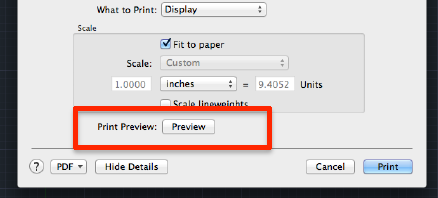
  • Print Preview is now added to the Print Dialog/pop-up.
  • Smaller PDF output**.
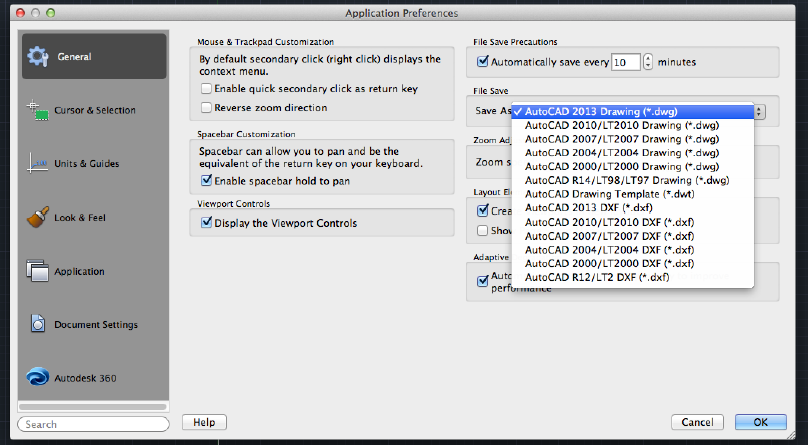
  • Default SaveAs format: it's now possible to set a default save-as version for your drawing. To set your save-as version, visit the Preferences dialog found in the AutoCAD menu.
  • Software Security Enhancements: For non-LT users, it helps prevent loading and running of unauthorized or malicious AutoLISP applications.
  • FIND command fixes: when searching a text in a drawing, the view will not switch back and will remain after the text found and located. It is more convenient to search a text in a big drawing.
  • Hardware requirements have not changed much, most users will assume the low specs are acceptable until they use the software fully in production.
Another year, another version: end-user wish lists still rank AutoCAD for Windows features as the most favored items to be added but many have yet to make the transition over to the Apple format.
Share/Bookmark

Sunday, August 26, 2012

Twitter Posts Revisited

Below is a summary of topics we covered recently on Twitter. Click on the links at the end of each topic and explore the command or feature in more detail in AutoCAD/LT's HELP. We post daily on the topic of AutoCAD/LT and features/abilities of interest to users:
You can find us at http://twitter.com/LTisACAD
Get Twitter updates via Text Message (SMS) by texting FOLLOW LTISACAD to 40404 in the United States. To stop SMS updates, simply text UNFOLLOW LTISACAD to the same number.
Catch a listing of all our twitter postings HERE: http://ltisacad.blogspot.com/search?q=tweets+this+week
Do you use Pinterest? We pin our favorite AutoCAD/LT news/tips/reviews/Op-Ed webpages to share with all of you at http://pinterest.com/pendeaninc/pins/

Share/Bookmark

Wednesday, July 6, 2011

Do you need to send DWG files?

In a recent Blog Post HERE, we offered tips and methods of sharing DWG files with others: clients, customers, vendors and contractors among others. But is sending a DWG file necessary?  AutoCAD/LT offeres many commands that create other formats from DWG files (see Export Options), and many recipients may prefer these over a DWG file.

The most common file exchange format in the world is PDF: it's universal, everyone has a free reader installed, and it's easy to view and print. If that's all the functionality your recipient needs, it's the perfect format for them. And you can create the PDF file by using the commands PLOT, PUBLISH, EXPORT or EXPORTPDF from inside AutoCAD/LT.
What if your recipient needs to markup your PDF or add comments? Most PCs are not equipped with such apps, and while a few free PDF Tools exist, they are very basic and do not have many features.

Created by Autodesk, another exchange format has existed for a while and gaining in popularity: DWF (and the Vista/Windows7 friendly DWFx). With the free Autodesk Design Review software, your recipient can not only view your files, but they can add comments, measure distances, and draw over your DWF file to communicate their changes. They can send the file back to you, you can the reference the file and the makups in AutoCAD/LT and edit your file accordingly. If they don't need markup, send DWFx files instead and any Windows Vista or Windows 7 user can view your file with no additional software to install.
Not sure what Windows version they have? All the recipient needs is an internet connection and a link to the Autodesk FREEWHEEL website to open, view and print any DWF file you send.
Or you can upgrade, for free, to the newly announced PROJECT QUICKSHARE: it ts the power in your hands to quickly share design files from anywhere at any time for free. Explore DWF files in real-time using a highly interactive online viewer: View 2D and 3D Design Files Online - Navigate multi-sheet documents, examine properties, hide layers, or review Mark-Up.

What if you need to maintain control of the markups and who accesses the files? And a history of the various comments made by others? AutoCADWS, and internet online secure viewing and reviewing from Autodesk is one solution that works. Pick up a free account HERE, start upload your files from inside AutoCAD/LT 2012 (if you are in a lower AutoCAD version you can do the same from any web browser), invite your clients/consultants, collaborate and markup live and together on the file(s), and save them in the DWG files for access back in AutoCAD/LT. The best thing about AutoCADWS is you  and your recipients do not need to be Windows users: any OS with Web Access, even a smart Phone with the free AutoCAD WS app for iPad, iPhone or Droid phone/Tablet. Explore more desktop customizations HERE.

Sharing files is easier than ever: communicate with your recipient and ask what they prefer to receive and accommodate them the best you can with these free tools. ◦
Share/Bookmark

Wednesday, June 29, 2011

How do you share DWG files?

One of the easiest and most common ways a typical AutoCAD/LT user shares files is by emailing their DWG file to a recipient. If there are any Referenced files (Xrefs), they are also dropped into the same email message and sent. The recipient, another experienced AutoCAD/LT user with a total understanding of your file structure and with all your custom fonts and shape files, drops each individual file in an identical folder to yours, including the Xrefs, and CAD-life is good for both of you.

The challenge of communicating your intent, file custom content (fonts, shape files etc.) and your filing structure for Xrefs to another user outside the above scenario, especially to a client/customer, needs to be more professionally presented, and more convenient for them (not you) to manage.
AutoCAD/LT can help with ETRANSMIT command: it packages a set of DWG files, and any associated support/dependent files like fonts, plot style tables, all referenced files etc., for transmission and distribution. The command has many features and options:
  • Feature: the DWG file you are in is automatically selected.
  • Feature: By default, dependent files are automatically included in the transmittal package unless you uncheck them. These include any attached DWG/ DGN/ DWF/ PDF/ DWFx/ Raster external references.
  • Option: include other dependent files that are part of your DWG file(s), such as Font Files (SHX and TTF Windows fonts), custom Hatch patterns and linetypes, PMP Plotter model parameter files (used to store configuration information specific to a plotter such as custom paper sizes), OLE objects (linked files) that are linked to files in the drawing are not included in the transmittal package, and CTB/STB plot style tables.
  • Option: Choose your final DWG format conversion here, without leaving the command.
  • Option: Save Transmittal Setups for your project.
  • Option: Package the transmittal package in a ZIP file, in a self-extracting EXE file, or in a folder that is copied to a specified location.
  • Option: Specify that the folder structure of the transmitted files be organized in a logical hierarchy, flattened into a single folder, or copied “as is” to the recipient's computer. If you specify an FTP or HTTP destination, the transmittal package uses the single folder option.
  • Option: Add password protection to the transmittal package, bind xrefs automatically, set the default plotter to “none,” and other options.
  • Explore these and other procedures for ETRANSMIT command through this LINK.
How do you get the content you've just create through ETRANSMIT command? There is that easy-for-you Email attachment option, and assuming the recipient is capable of receiving that large a package, their email server is not set to block your attachment (or deem it Spam and drop it in the wrong folder), your client is expecting it, and confirms receipt of it in a timely fashion, is that the only method to ensure prompt and safe delivery? Explore more about this command HERE.

Online File Sharing is a popular solution: whether your company wishes to host the service on their servers, or an off-site third-party vendor (or your company's Internet Provider/WebHosting service), these offer as limited or as detailed set of features you want. Many allow you to send links to recipients to download the files, or have alerts sent directly to them from watched folders on your server or on remote servers.
FTP is the most popular form for this type of file sharing/delivery system. Many are FREE, others have monthly unlimited files or per-file-count charges and are hosted on secure remote servers. Autodesk, for a per-project price, offers a similar service called BUZZSAW and a free Technology Preview from their Labs, Project Nitrous.

Many popular free and low cost File Sharing services like WIKISEND, YOUSENDIT, BIGUPLOAD, 4SHARED (and MORE), as well as established more permanent online file sharing services like DROPBOX and BOX.net, offer more options including file syncing and even Mobile Device Access.

Options are plenty for sharing and sending files: explore them and create a professional experience for your recipients and clients wit these tools. ◦
Share/Bookmark