Monday, January 6, 2014

Twitter Posts Revisted

Below is a summary of topics we covered recently on Twitter. Click on the links at the end of each topic and explore the command or feature in more detail in AutoCAD/LT's HELP.
We post daily on the topic of AutoCAD/LT and features/abilities of interest to users:
You can find us at http://twitter.com/LTisACAD  and on Facebook at https://www.facebook.com/LTisACAD
Get Twitter updates via Text Message (SMS) by texting FOLLOW LTISACAD to 40404 in the United States. To stop SMS updates, simply text UNFOLLOW LTISACAD to the same number.
Catch a listing of all our twitter postings HERE: http://ltisacad.blogspot.com/search?q=tweets+this+week
Do you use Pinterest? We pin our favorite AutoCAD/LT news/tips/reviews/Op-Ed webpages to share with all of you at http://pinterest.com/pendeaninc/pins/
Share/Bookmark

Tuesday, October 22, 2013

AutoCAD/LT for MAC 2014: It's here!

Revised Welcome Screen

The long anticipated 2014 release of AutoCAD for MAC was announced to all users on Subscription October 18, 2023. But no one could find it to download it (see HERE): but if you are on Subscription you can get it now, today, October 22, 2013.

So, what is new in AutoCAD for MAC 2014 edition? Let's first examine what end users are wishing for, a question we posed at the Autodesk Discussion Forums:
  • Would like to see camera / animation features.  Material import ability.
  • Usability in 3d, fix the bugs, bring it on par with Windows.
  • Start releasing the verticals.
  • Export layouts in pdf format. On windows platform the function seems pretty easy: different sizes sheets exporting in one pdf file. On mac all sheets can be combined in one pdf file but with the only one sheet size (A4, for example).
  • It could be great to see selection filters, multiline styles and ole objects.
  • IGES import.
  • DGN import
  • Express Tools
  • Smaller PDF output**
  • Retain window/palette positions after closing
  • Content Explorer.
  • Be able to Scale materials from the Material Browser for rendering, just as the Windows AutoCAD.
  • All windows version functions with mac interface.

Here is what Autodesk delivered with AutoCAD for Mac 2014:
  • Drawing Sync allows you to directly access your files from Autodesk 360 and synchronize them between your computer and the cloud (you will need to be signed in to Autodesk 360 first).
  • Package Drawing (Similar to eTransmit command in AutoCAD for Windows) allows you to quickly collect related files into a compressed folder for easy distribution or storage.
  • Retina Display Support.
  • Autodesk has revamped the Welcome Screen to create a more-functional experience.
    Now it’s easier to work with files when creating a new drawing or working on an existing one.
    It also gives the user quick access to learning materials, cloud storage, and helps connect with other AutoCAD for Mac users so you collaborate, share information, and solve problems.
  • Online Help: less cluttered and with focused search-based access to the information you need, mark pages for future reference and refine your search results by choosing the following topic types: Documentation, Installation & Deployment and Developer’s documentation.
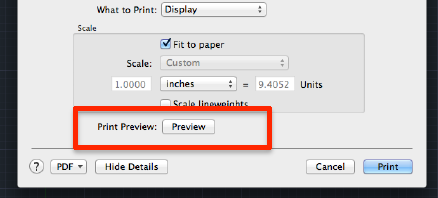
  • Print Preview is now added to the Print Dialog/pop-up.
  • Smaller PDF output**.
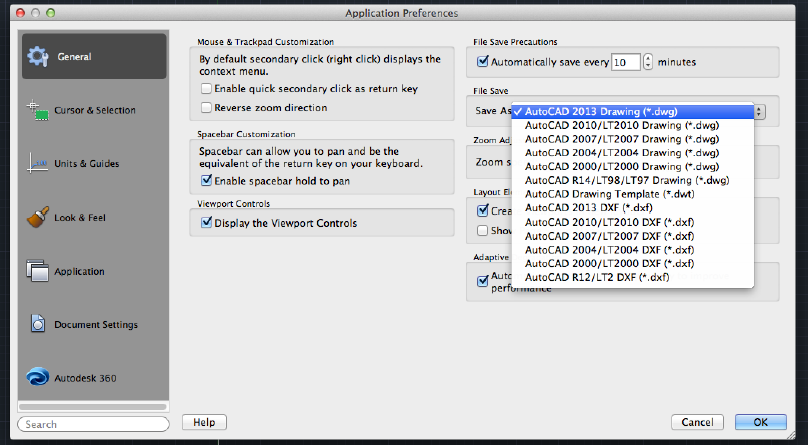
  • Default SaveAs format: it's now possible to set a default save-as version for your drawing. To set your save-as version, visit the Preferences dialog found in the AutoCAD menu.
  • Software Security Enhancements: For non-LT users, it helps prevent loading and running of unauthorized or malicious AutoLISP applications.
  • FIND command fixes: when searching a text in a drawing, the view will not switch back and will remain after the text found and located. It is more convenient to search a text in a big drawing.
  • Hardware requirements have not changed much, most users will assume the low specs are acceptable until they use the software fully in production.
Another year, another version: end-user wish lists still rank AutoCAD for Windows features as the most favored items to be added but many have yet to make the transition over to the Apple format.
Share/Bookmark

Tuesday, May 21, 2013

AutoCAD WS graduates: well, for a fee


AutoCAD WS, the highly successful free platform-independent DWG files viewer, markup, and collaboration tool, available as a mobile app (ideal for remote access and fieldwork), and also available as a web app (for easy sharing, drawings reviews, and collaboration), turns a new leaf today to show us a sneak preview into the CAD of tomorrow where loyalties to an OS become irrelevant and the choices of devices open up for all users.

Wow, that's a long sentence with a lot of promise. So what is the reality:
  • AutoCAD WS has a new name: AutoCAD 360. It now reflects the commitment Autodesk is making to the Cloud with the Autodesk 360 Service and Storage offerings.
  • Look for this new AutoCAD 360 as a mobile app that will replace the old AutoCAD WS starting today from your mobile devices' app stores.
  • New mobile features include a "smart pen" that helps you sketch ideas faster, simplify and improve fieldwork with some additional tools.
  • AutoCAD 360 Mobile will be available in three versions: FREE, Pro, and Pro Plus.
  • AutoCAD 360 Web App is also being introduced: released as a full public "beta" it has a redesigned user interface focused on ease of use and collaboration. Thus new app is HTML5 based and it will eventually replace the AutoCAD WS Web App eventually.
  • Look for this new "360" branding to expand into all of Autodesk's web and mobile apps.
AUTOCAD 360 MOBILE
  • FREE: This free version will not differ significantly from the old AutoCAD WS mobile app. You can easily view, edit and share DWG files from any smartphone or tablet running iOS or Android OS. Simplify site visits (take your drawings with you, not a big roll of paper); fast and easy design review for your client, partners and supervisors; collaborate with team members remotely, even access the same drawings on the web on any computer with a browser. Plus 5Gig of free storage.
  • PRO: starting at $4.99/month (or $49.99/year), you gain access to more tools. You can create new drawings from scratch; larger file support (30MB DWG files); easily view, markup and edit drawings from popular sites like Dropbox, Box, Egnyte, Buzzsaw and custom WebDAV connections; addition of coordinates points for better drawing accuracy; Arc and Arrow drawing tools added; more drawing tools like Extended Vertex, Offset and Mirror; advanced Layer management (add, rename, isolate, invert and lock); view object properties (layer, length, area); view, edit and add block attributes; access a drawing's blocks to add and place in the file; more measuring and dimensioning tools; AND Priority Support (you are paying for it after all. Plus free storage up to 25Gig.
  • PRO PLUS: for $99.99/year, you get all the features of the PRO version, with drawing files size increase to 40MB and access to 100Gig of storage.

Visit your mobile device's apps store to download the free app and find out for yourself.
Or explore it all now at http://www.autocad360.com (replaces the old site at http://www.autocadws.com), sign up for free account and see where the future of CAD is headed whether you are ready for it or not. Be aware though: you need to use a modern webbrowser like Google Chrome for best results.

Share/Bookmark

Tuesday, March 26, 2013

AutoCAD LT2014 Updated Commands/Variables

The following commands have been updated in LT2014 as follow:
  • ARC: Adds the ability to create arcs in a clockwise direction by holding down the Ctrl key as you drag.
  • CHAMFER: Now chamfers the first and last segments of an open polyline to create a closed object.
  • CONVERTPSTYLES: Now retains spaces in the names of converted plot styles.
  • DIMBASELINE: By default, the baseline dimension now inherits the style of the dimension that is being continued. This setting is affected by DIMCONTINUEMODE.
  • DIMCONTINUE: By default, the continued dimension now inherits the style of the dimension that is being continued. This setting is affected by DIMCONTINUEMODE.
  • EXTERNALREFERENCES: Adds the ability to convert xrefs between overlays and attachments. Also adds the ability to change a path to be absolute.
  • FILLET: Now fillets the first and last segments of an open polyline to create a closed object.
  • HATCH: Adds Undo to command prompts.
  • LAYER: Now uses natural language sorting for the layer list, so that numerals are sorted in order of their values. Also adds the ability to merge selected layers by using the shortcut menu in the Layer Manager
  • MTEXT: Annotation scale in the Select Annotation Scale dialog box is set only with a drop-down list (no direct entry).
  • NEWSHEETSET: The Creation Date (CreateDate) field in a new sheet now reflects the drawing creation date, not the template creation date.
  • PROPERTIES: Xref-dependent linetypes are no longer displayed in the Preferences window.
  • TEXT: Adds Left to the Justification prompt options. Retains the last used justification during the session.
  • -XREF: Adds Pathtype prompt.
Updated system variables in LT2014:
  • ATTDIA: Default value changed from 0 (off) to 1 (on).
  • LATITUDE: Now linked to the Latitude setting in the Geographic Location dialog box.
  • LONGITUDE: Now linked to the Latitude setting in the Geographic Location dialog box.
  • NORTHDIRECTION, which pecifies the angle between the Y axis of WCS and the grid north is now also available in AutoCAD LT.
  • ONLINESYNCTIME: Default value changed from 5 to 300 minutes.
  • SNAPGRIDLEGACY, which controls whether the cursor snaps to the snap grid only when an operation is in progress, is now also available in AutoCAD LT.

Share/Bookmark

AutoCAD LT2014 Obsolete Commands/Variables

The following commands are now obsolete in LT2014:
  • AUTOCOMPLETE: Replaced by INPUTSEARCHOPTIONS.
  • ONLINEUPLOAD: Replaced by ONLINEOPENFOLDER. In addition, the automatic upload process has been revised. It is now turned on or off for all drawings in the Options dialog box, Autodesk 360 tab.
  • OPENONMOBILE, which sent a notification to your mobile devices for opening the current drawing: Notification is now handled by email.
Obsolete System Variables:
  • AUTOCOMPLETEDELAY: Replaced by INPUTSEARCHDELAY
  • AUTOCOMPLETEMODE: Replaced by INPUTSEARCHOPTIONS
  • ONLINEDOCUMENTS, which Stores whether you can open and save drawing files directly to your Autodesk 360 account, has been removed.

Share/Bookmark